




UPS vs Surge Protector: Which One Should You Choose?
UPS vs surge protector explained: one blocks voltage spikes, the other keeps your PC running through outages. See the real differences and which you need.


A surge protector guards your electronics against sudden voltage spikes, while a UPS (uninterruptible power supply) does that and also keeps your devices running on battery when the power cuts out. That one difference settles most of the UPS vs surge protector debate. If your only worry is lightning or a spike frying a TV or charger, a good surge protector is enough. If losing power for even a second would cost you unsaved work, corrupt a drive, or knock your router offline in the middle of a call, you want a UPS for those devices and a surge protector for everything else.
Table Of Content
- What is the difference between a UPS and a surge protector?
- How does a surge protector work?
- What specs should you check on a surge protector?
- Is a power strip the same as a surge protector?
- How does a UPS work?
- What’s inside a UPS
- When the power is normal
- When the power fails
- While running on battery
- When the power comes back
- How long will a UPS keep my PC running?
- Is a UPS a surge protector?
- UPS vs surge protector: which one fits your setup?
- Desktop PC or gaming PC
- Laptop
- Wi-Fi router and modem
- TV, soundbar, and game console
- NAS or home server
- Printers
- Can you plug a surge protector into a UPS?
- How do you size a UPS?
- Conclusion
- Frequently Asked Questions
What is the difference between a UPS and a surge protector?
The short version: a surge protector handles too much voltage, and a UPS handles too much, too little, and none at all.
A surge protector sits between the wall and your devices and does nothing until voltage jumps above a safe level. When that happens, it diverts the extra energy away from whatever is plugged in. It has no battery, so the moment the power goes out, everything plugged into it goes dark.
A UPS has a battery and an inverter inside. When it senses an outage or a deep voltage drop, it switches your devices over to battery power, usually within a few milliseconds, fast enough that a desktop PC keeps running. Most UPS units also include surge protection on their outlets, which is why people often call them a “UPS surge protector.”
Here’s how they compare side by side:
| # | Feature | Surge protector | UPS |
|---|---|---|---|
| 1 | Blocks voltage spikes | Yes | Yes, on most models |
| 2 | Keeps devices on during an outage | No | Yes, for minutes |
| 3 | Handles brownouts (low voltage) | No | Yes (line-interactive and online types) |
| 4 | Battery inside | No | Yes, needs replacing over time |
| 5 | Size and weight | Small, light | Bulky and heavy |
| 6 | Cost | Low | Several times higher |
| 7 | Best for | TVs, chargers, lamps, printers, game consoles | Desktop PCs, NAS drives, modems and routers, home office gear |
How does a surge protector work?
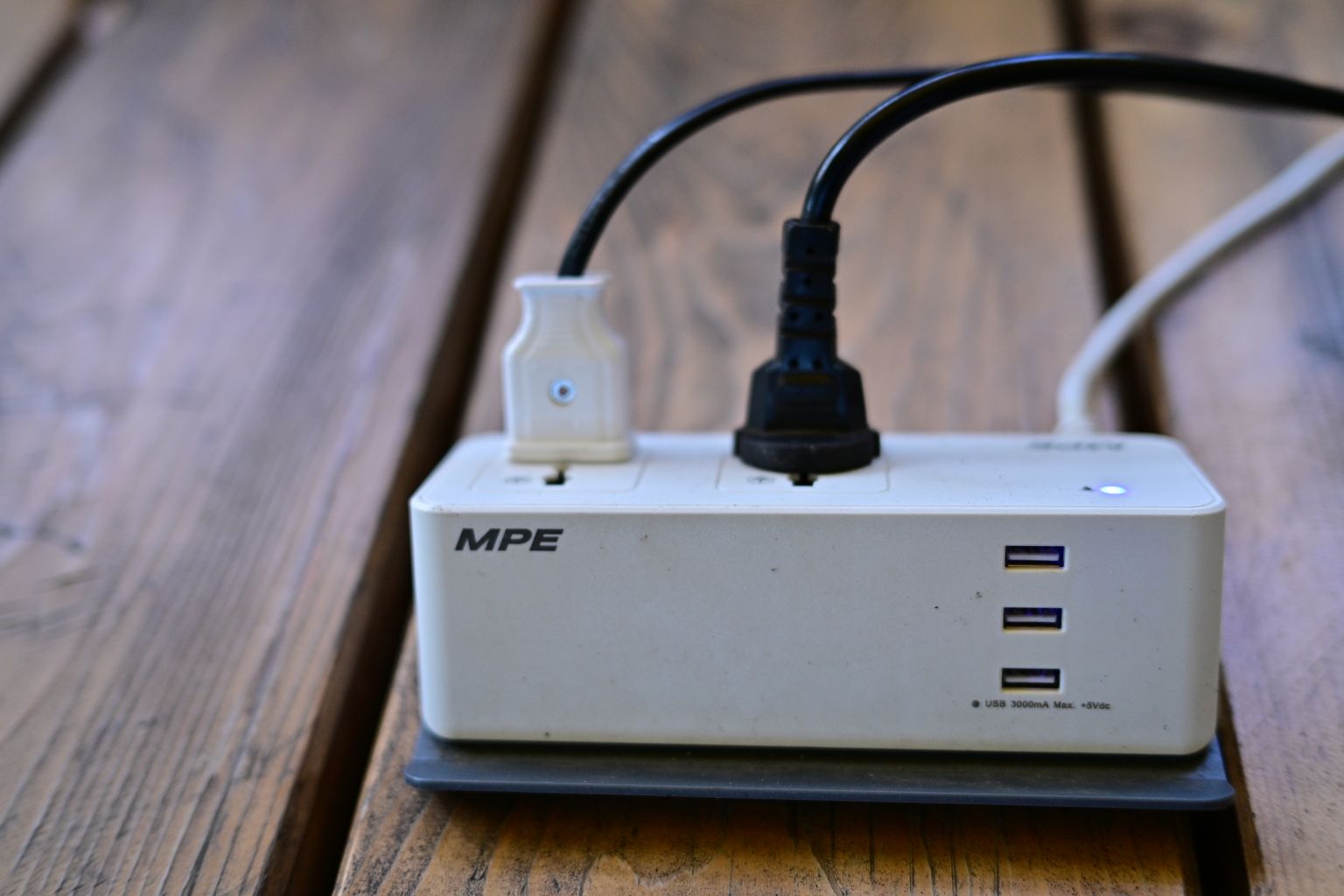
Inside most surge protectors are components called metal oxide varistors, or MOVs. Under normal voltage they barely conduct. When voltage spikes, they suddenly start conducting and dump the excess energy to ground, so your laptop charger never sees it.
The catch is that MOVs wear out. Every surge they absorb uses up a bit of their capacity, and after a big hit or years of small ones, the protection can quietly fail. The strip keeps passing power, so it looks fine, but it’s now just an expensive extension cord. New Mexico State University’s guide to surge protectors points out exactly this risk, which is why a “protected” indicator light is worth paying for.
What specs should you check on a surge protector?
- Joule rating: how much energy it can absorb before failing. At least 600 joules is a sensible floor for computers and TVs, and higher is better.
- Clamping voltage: the voltage at which it starts diverting energy. Under the UL 1449 standard, the ratings are 330V, 400V, and 500V, and lower means better protection. Aim for 330V or 400V.
- UL 1449 listing: look for “surge protective device” or “transient voltage surge suppressor” on the label. A power strip that is only UL listed as an extension cord offers no surge protection at all.
- Protection indicator light: tells you when the MOVs are spent and it’s time to replace the unit.
Is a power strip the same as a surge protector?
No, and this trips up a lot of people. A basic power strip just splits one outlet into several. It has no MOVs and no surge rating. If the packaging doesn’t list a joule rating and clamping voltage, assume it’s a plain power strip.
How does a UPS work?
An uninterruptible power supply sits between the wall socket and your devices. It keeps a battery charged while the power is on and takes over the moment the power fails.
What’s inside a UPS
- Charger (rectifier): Converts AC from the wall into DC to keep the battery charged.
- Battery: Stores backup power. Most home units use sealed lead-acid, while newer models use lithium-ion, which lasts longer and weighs less.
- Monitoring circuit: Watches the incoming voltage at all times.
- Transfer switch: Moves your devices from wall power to battery power when needed.
- Inverter: Converts the battery’s DC back into the AC your devices run on.
- Surge protection: Absorbs voltage spikes before they reach your equipment.
When the power is normal
Your devices draw power from the wall as usual. The charger keeps the battery full, and the surge protection filters out spikes from lightning or grid faults.
When the power fails
- The monitoring circuit detects that voltage has dropped too low, spiked too high, or cut out.
- The transfer switch disconnects your devices from the wall and connects them to the battery side.
- The inverter turns the battery’s DC into usable AC power.
This all happens in a few milliseconds, faster than most PC power supplies can notice. Your screen won’t flicker and nothing restarts.
While running on battery
The UPS usually beeps to let you know. Many models also connect to your computer over USB, so they can save your work and shut the system down safely before the battery runs out.
When the power comes back
Once wall power returns and stays stable, the UPS switches your devices back to mains and starts recharging the battery for next time.
How long will a UPS keep my PC running?
Not long, and that’s by design. A UPS buys you time to save your work and shut down properly. Runtime depends entirely on how much power you draw. A 1000VA / 600W unit might run a 300W desktop for around 10 minutes but a 600W gaming rig for only about 3. Every manufacturer publishes runtime charts, so check them against your actual load before buying.
Is a UPS a surge protector?
Most of the time, yes. Nearly every consumer UPS includes surge protection, and many list a joule rating on the box just like a surge protector does. The thing to watch for is the outlet layout. A lot of UPS units have two groups of outlets: “battery + surge” and “surge only.” Plug your PC, monitor, and router into the battery outlets, and put things like a printer or desk lamp on the surge-only side.
So if you already have a UPS, you usually don’t need a separate surge protector for the devices plugged into it. You will still want surge protectors for everything else in the house that isn’t on the UPS.
UPS vs surge protector: which one fits your setup?

Pick based on what an outage would cost you, not on how expensive the device is. Here’s how I’d decide for the most common setups.
Desktop PC or gaming PC
Get a UPS surge protector for the PC tower and monitor. A desktop has no battery, so a one-second blip means an instant hard shutdown. That can mean lost work, a corrupted game save, or in the worst case a damaged Windows update. If you game, check whether the UPS outputs a pure sine wave. Some power supplies with active PFC don’t play well with the cheaper “simulated sine wave” units and may shut off when the UPS switches to battery.
Laptop
A surge protector is enough. Your laptop already has a battery, which is basically a built-in UPS. The surge protector covers the charger and any dock or monitor.
Wi-Fi router and modem
A small UPS here is one of the best-value upgrades you can make. Routers and modems take a minute or two to reboot, so even a short flicker can drop your video call or online game. Small fixes like this are what we focus on at TheTechNeo, and if you already deal with flaky connections, our guide on how to fix slow DNS lookup covers the other half of keeping your home internet stable.
TV, soundbar, and game console
A surge protector does the job. Losing the TV for a few seconds during a power cut is annoying, not damaging, and these devices draw too much power to run for long on a home UPS anyway.
NAS or home server
Always a UPS, preferably line-interactive with a USB cable so the NAS can shut itself down cleanly when the battery runs low.
Printers
Keep laser printers on a surge protector or the “surge only” UPS outlets. They pull a big burst of current when the fuser heats up, which can overload a UPS battery circuit. If your printer acts up after a power hiccup, our walkthrough on how to fix a printer offline error will get it back on the network.
Can you plug a surge protector into a UPS?
You can physically do it, but most UPS manufacturers advise against it and some say it voids the warranty. Chaining a surge strip into a UPS can let you overload the battery outlets without noticing, and the two sets of surge components can interfere with each other’s grounding. If you need more outlets, buy a UPS with enough battery outlets for your critical gear.
The reverse, plugging a UPS into a surge protector, is also discouraged by most makers for similar reasons. Plug the UPS directly into a grounded wall outlet.
How do you size a UPS?
Add up the wattage of everything that will run on battery. Your PC’s power supply rating is the maximum, not what it actually draws, so a cheap plug-in power meter gives you a more realistic number. Then pick a UPS whose watt rating (not VA rating) is at least 20 to 25 percent higher than your total.
Don’t get fooled by the big VA number on the box. VA (volt-amperes) is apparent power and is always higher than watts. A rough rule of thumb is that watts come out to about 60 percent of the VA rating, so a “1000VA” unit is often around 600W. Check the spec sheet for the actual figure.
Conclusion
The UPS vs surge protector choice comes down to one question: can that device survive suddenly losing power? If it can (TVs, chargers, lamps, laptops), a well-rated surge protector with a low clamping voltage and an indicator light is all you need. If it can’t (desktop PCs, routers, NAS drives), put it on a UPS, ideally a line-interactive model, and let the UPS handle surge protection too. Most homes end up with both, and that’s the right call.
Frequently Asked Questions
Q1:Do I need a surge protector if I have a UPS?
Q2:Is a battery backup better than a surge protector?
Q3:How long does a UPS battery last?
Q4:How often should I replace a surge protector?
Q5:What should not be plugged into a UPS?
Q6:Does a UPS protect against lightning?



No Comment! Be the first one.